Making Tax Digital VAT returns, worked out from your records.
Keep your sales and purchases in FileThat and the nine boxes are worked out for you, or upload the nine figures from your own spreadsheet. Check them, confirm and file with HMRC. From £3.99 a return, and NIL returns are always free.
HMRC-recognised
NIL returns free
No monthly subscription
How VAT returns work in FileThat
Every VAT-registered business must file its VAT returns through Making Tax Digital software unless HMRC has exempted it. FileThat connects to HMRC with your permission, shows the returns HMRC is expecting, and files each one straight to HMRC.
The figures come from your digital records. Each record has a category, and the category decides which box it lands in: VAT on sales in box 1, VAT on purchases in box 4, the values in boxes 6 and 7. Boxes 3 and 5 are added up for you.
You do not type figures into the boxes. If something looks wrong, you correct the record behind it, add an adjustment, or upload your spreadsheet again, so the return always matches the records that support it.
See a VAT return filed
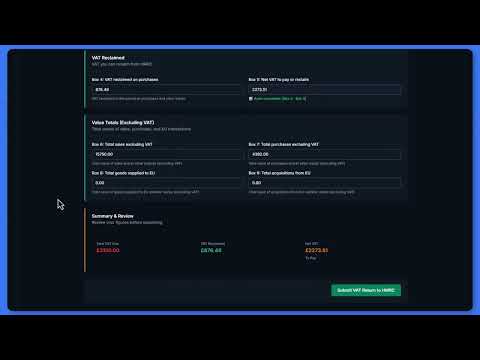
Filing a VAT Return
Pick the period, check the nine boxes and submit your VAT return to HMRC.
Three ways to file
From your records
Add sales and purchases as they happen, upload a bank statement, or scan receipts. The nine boxes are worked out from the records dated in the period.
From your spreadsheet
Fill in our template, or your own sheet using its nine row labels, and upload it as CSV or Excel. FileThat bridges it to HMRC.
A NIL return
Nothing to declare this quarter? Tick Nil Return, every box is set to zero, and it never costs a credit.
More on filing from a spreadsheet: MTD bridging software.
Filing a return
Connect to HMRC
Add your VAT number to your business and connect FileThat to HMRC for VAT.
Pick the period
FileThat shows the open VAT periods HMRC holds for you.
Check the boxes
The nine boxes are filled from your records or spreadsheet, with a summary of what you owe or are owed.
Confirm and file
Confirm HMRC's declaration and submit. You get a receipt by email, and the records behind the return are locked.
The VAT you need
Standard and flat rate
Set your scheme and rate on your business. On the flat rate scheme, box 6 is your VAT-inclusive turnover and FileThat warns you if it passes £150,000.
Reverse charge
Construction work you sell under the domestic reverse charge, services bought from overseas and postponed import VAT each land in the right boxes, from their own categories.
Adjustments with a reason
Bad debt relief, an unpaid supplier after six months, a fuel scale charge or an error correction go in a dated adjustment journal against box 1 or box 4, each with its reason.
Boxes 2, 8 and 9
These are for goods moved between Northern Ireland and the EU. Most businesses leave them at zero, and FileThat does too unless your spreadsheet says otherwise.
Invoice your customers from FileThat too: invoicing.
Good to know
Charged only when HMRC accepts it
A return costs one credit, from £3.99, and only once HMRC has accepted it. If HMRC rejects a return, you are not charged.
NIL returns are always free
A return with every box at zero never uses a credit, whatever your balance.
Your spreadsheet has to be complete
An upload needs all nine boxes. A blank cell is treated as missing, not as zero, and the whole file is refused with the rows to fix.
Schemes not covered
There is no setting for cash accounting, annual accounting, or retail and margin schemes. If you use one of those, check with your accountant before relying on the worked out figures.
Every price, in full: FileThat pricing.
Straight answers
Is a NIL VAT return free?
Yes, always. A VAT return with every box at zero never uses a credit, whether or not you have any. FileThat decides it from the figures themselves, so a return is free whenever all nine boxes are zero.
How much does a VAT return cost?
One credit per return that is not a NIL return. A credit is £3.99, £4.99 or £5.99 depending on your income, or £2.99 for agents, and you are only charged once HMRC accepts the return. There is no subscription, and 4 free credits come with every new account.
Can I type my VAT figures straight into the boxes?
No. The boxes are worked out from your digital records or from a spreadsheet you upload, so every figure has records behind it. To change a figure, correct the record, add an adjustment with a reason, or upload your spreadsheet again.
Can I keep my VAT records in a spreadsheet?
Yes. Download the template, or use your own sheet with the template's nine row labels in the first column, and upload it as CSV or Excel. All nine boxes must have a figure, using 0 where there is nothing to declare.
Does FileThat support the flat rate scheme?
Yes. Set flat rate and your percentage on your business, and box 6 becomes your VAT-inclusive turnover. Purchases do not reclaim VAT on the flat rate scheme, apart from a capital asset costing £2,000 or more including VAT, which you claim through the adjustment journal.
Can I file VAT without using FileThat for Income Tax?
Yes. A business can be set up for VAT only, with just its VAT number. You can keep its records in FileThat or upload a spreadsheet each quarter, and you only pay for the returns you file.
File your next VAT return with FileThat
4 free credits, no card needed. Then from £3.99 per VAT return, NIL returns free, and no monthly subscription.
Get started free