Free invoicing that feeds your Making Tax Digital records.
Create a branded invoice, email it as a PDF, and when your customer pays, mark it paid. For a sole trader or landlord, the income goes straight into your digital records, ready for your quarterly update. Free, with no limit on invoices.
Free to use
Your logo and colours
No monthly subscription
How invoicing works
Set up a template once with your logo, colours, business details and bank details. Then each invoice is a customer, a few lines of work, and a send button.
If your business is VAT registered, your VAT rate is applied to the invoice. If it is not, no VAT is added, so you cannot charge VAT by mistake.
When the money arrives, mark the invoice as paid. If you file Income Tax through FileThat, it is recorded as income in your digital records, so it is counted in your quarterly update without being typed in twice. A business set up for VAT only adds its sales as records itself.
See an invoice sent
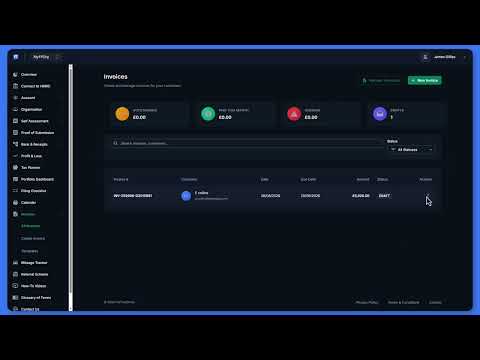
Creating and Sending an Invoice
Create an invoice with line items, send it by email, and turn it into a digital record when it is paid.
What you get
Branded PDF invoices
Your logo, colour, VAT number, company number, payment terms and bank details on every invoice, with as many templates as you need.
Sent by email
Email the invoice as a PDF from FileThat. When your customer replies, the reply comes to your own inbox.
Paid means recorded
For a sole trader or property business, mark an invoice paid and it becomes an income record, once, in the right category.
CIS reverse charge
For construction work under the domestic reverse charge, tick the box: no VAT is charged and the invoice tells your customer to account for it.
What HMRC expects your records to show: HMRC digital record keeping.
Sending an invoice
Make a template
Add your logo, colour, business and bank details once.
Add the work
Your customer's name and email, then a line for each job or item.
Send it
Preview the PDF and email it to your customer.
Mark it paid
When the money arrives, mark it paid and the income is in your records.
Good to know
Free, with no limit
Invoicing never uses a credit. You only pay when you file a quarterly update or a VAT return.
Bad debt relief
If a VAT invoice is still unpaid six months after it was due, FileThat offers it as bad debt relief on your VAT return. You decide whether to claim.
One VAT rate per invoice
Each invoice has a single VAT rate. If you sell items at different rates, put them on separate invoices.
You chase payment
FileThat sends the invoice, but it does not send payment reminders or take card payments. Your bank details are on the invoice for your customer to pay you directly.
Got a bank statement to bring in as well? See AI bank statement categorisation.
Straight answers
Is FileThat's invoicing free?
Yes. Creating, sending and recording invoices never uses a credit, and there is no limit on how many you send or how many templates you make. You only pay when you file a quarterly update or a VAT return with HMRC.
Does a paid invoice go into my Making Tax Digital records?
Yes. For a sole trader or property business, marking an invoice as paid creates one income record from it, as Sales and fees, or as Rent income for a property business. That record is then counted in your quarterly update like any other.
Can I add VAT to my invoices?
If your business is VAT registered, yes: your VAT rate is applied to the invoice, and your VAT number can be printed on it. If it is not registered, FileThat adds no VAT, so you cannot charge VAT you are not entitled to.
Does it handle the CIS domestic reverse charge?
Yes. Tick the reverse charge box on an invoice for construction work your customer must account for. No VAT is charged, and the invoice tells the customer to account for the VAT to HMRC themselves.
Will FileThat chase late payers for me?
No. FileThat emails the invoice with your bank details on it, but it does not send reminders, take card payments or mark invoices overdue. Replies to the invoice email come straight to you, so you can follow up yourself.
Send your next invoice from FileThat
Invoicing and record keeping are free. 4 free credits for your first filings, no card needed, and no monthly subscription.
Get started free